1 × DOS1102S Digital Oscilloscope 2 × Passive Probes (likely 1X/10X switchable) 1 × Power Adapter (DC powered) 1 × USB Data Cable 1 × User Manual (Multilingual) 1 × U Disk (for data transfer/software) 1 × Calibration Line (if included) 1 × Carrying Case or Protective Foam (if bundled as pro kit)
Key Features
110 MHz bandwidth
Dual channels
1 GS/s sampling rate
10K memory depth
10 MHz bandwidth signal generator
7" TFT color display, 65535 colors, 800×480 resolution
Delivery time
3-4 Business Days
Presentamos el osciloscopio de sobremesa de 110 MHz de HANMATEK®, el modelo DOS1102S, diseñado tanto para profesionales como para aficionados. Este avanzado instrumento ofrece un ancho de banda de 110 MHz, lo que lo hace ideal para capturar y analizar señales con rápida evolución con precisión.
El DOS1102S cuenta con una gran pantalla de 7 pulgadas con controles intuitivos que facilitan su uso. Su alta frecuencia de muestreo de 1 GSa/s garantiza la visualización de hasta los detalles más complejos de la forma de onda. Tanto si prueba fuentes de alimentación como si trabaja con circuitos digitales de alta velocidad, este osciloscopio de sobremesa de 110 MHz ofrece un rendimiento fiable.
Diseñado para ofrecer versatilidad, el osciloscopio cuenta con múltiples modos de disparo, lo que permite realizar análisis de señales complejos. Puede capturar fácilmente eventos transitorios y visualizarlos con claridad. Además, la capacidad de almacenamiento de datos integrada le permite guardar y recuperar formas de onda cuando lo desee.
Función de Zoom de Forma de Onda
Abra el modo de zoom de forma de onda. La parte superior de la pantalla muestra la ventana principal y la inferior, la ventana de zoom. Esta ventana es una porción ampliada del área seleccionada en la ventana principal. Permite observar más detalles de la forma de onda y facilitar la lectura de los parámetros.
Función de Análisis de Espectro FFT Integrada
La conversión FFT del dominio temporal al dominio frecuencial. La unidad de análisis FFT de este osciloscopio DOS1102 es el voltaje, lo que resulta más intuitivo que la visualización en decibelios (db) de los osciloscopios tradicionales. Además, ofrece la función FFTrms, compatible con los estilos de panel rectangular, Hamming, Hanning y Black-Harris.
Función de Cursor Automático
Esta función permite medir rápidamente la diferencia entre dos puntos de la forma de onda. La posición del cursor automático es horizontal. El punto de cruce del cursor vertical y la forma de onda se establece automáticamente para facilitar el análisis de la medición en tiempo real o la forma de onda guardada.
Visualización de todas las mediciones con un solo clic
Función para visualizar todos los valores medidos con un solo clic. Permite visualizar simultáneamente 30 conjuntos de valores de medición. Encuentre rápidamente los parámetros de medición sin tener que agregarlos manualmente.
Alto rendimiento
El osciloscopio ofrece un alto rendimiento y puede medir señales de onda sinusoidal de 110 MHz, ondas cuadradas y otras señales.
Compatible con varios idiomas
Disponible en chino, inglés, ruso, alemán, español, francés, italiano y japonés (8 idiomas) e instrucciones en 8 idiomas. Satisfaga las necesidades de sus amigos, empleados o estudiantes de diferentes países.
El DOS1102S también incluye mediciones automatizadas, lo que facilita el análisis de formas de onda. Mida todo, desde la frecuencia y el período hasta los tiempos de subida y bajada, con solo unos clics. Su interfaz intuitiva permite a los usuarios concentrarse en su trabajo sin distracciones innecesarias.
La conectividad es muy sencilla gracias a sus múltiples canales de entrada y puertos USB para la transferencia de datos. Ya sea que necesite documentar sus hallazgos o compartirlos con sus colegas, este osciloscopio de sobremesa de 110 MHz le ofrece la solución perfecta.
Diseñado para durar, el HANMATEK® DOS1102S cuenta con el respaldo de una alta calidad, lo que le garantiza una herramienta confiable para sus necesidades de prueba y medición. ¡Explore hoy mismo las características confiables, precisas y robustas de nuestro osciloscopio y mejore sus capacidades de prueba!
How to Use Hanmatek DOS1102S Oscilloscope with Waveform Generator
1️⃣ What is the DOS1102S Oscilloscope?
The Hanmatek DOS1102S is a 2-channel digital oscilloscope integrated with a built-in waveform generator. Key features:
2 input channels – simultaneous signal observation.
100MHz bandwidth – captures high-speed analog and digital signals.
Waveform generator – produces standard signals like sine, square, and triangle for testing circuits.
Digital display and measurement tools – voltage, frequency, period, RMS, rise/fall time.
Purpose: Designed for electronics engineers, hobbyists, and educators, the DOS1102S allows both measurement and signal generation, enabling comprehensive testing, debugging, and training in electronics.
2️⃣ How it Works
The DOS1102S combines signal acquisition and signal generation in one device:
Signal Acquisition (Oscilloscope Mode):
Connect probes to circuit signals. Signals pass through vertical scaling and coupling circuits. ADC digitizes signals and displays waveforms on the screen.
Waveform Generation (Function Generator Mode):
Select desired waveform type (sine, square, triangle, or pulse). Set frequency, amplitude, and offset. Output waveform to a circuit for testing, calibration, or simulation.
Triggering & Measurement:
Edge, pulse, or slope triggers stabilize waveform display. Cursors, auto-measurements, and math functions provide quantitative analysis.
Tip: Use the waveform generator to simulate signals for testing circuit response, then observe results simultaneously on the oscilloscope channels.
3️⃣ Key Specifications Explained
Channels:2 simultaneous input channels for multi-signal measurement.
Bandwidth:100 MHz maximum signal frequency.
Sampling Rate: Up to 1 GSa/s for accurate waveform capture.
Waveform Generator: Can generate sine, square, triangle, and pulse signals from 1 mHz to 1 MHz.
Display:7-inch color LCD with waveform plotting.
Trigger Types: Supports edge, pulse, and slope triggers.
Measurement Functions: Measures voltage, frequency, period, rise/fall time, and RMS.
Bandwidth and sampling rate capture fast transients accurately.
Trigger system ensures stable display even with complex signals.
4️⃣ Typical Use Cases
Circuit testing and debugging – measure signals and test circuit response.
Signal injection for calibration – generate reference waveforms to verify circuit behavior.
Power supply testing – simulate AC input or pulses and monitor output response.
Educational labs – teach waveform generation and analysis concepts.
Embedded system debugging – verify microcontroller or sensor outputs against generated test signals.
Example scenario: An engineer testing a filter circuit generates a square wave at 1kHz. Using the oscilloscope, they observe the circuit’s output waveform to verify proper filtering behavior.
5️⃣ How to Use the Device (Step-by-Step)
Safety First: Wear protective equipment; ensure probes are rated for the voltage being tested.
Power On: Turn on the oscilloscope and perform self-calibration.
Connect Probes: Attach probes to the circuit for measurement.
Select Coupling: Choose AC or DC depending on signal type.
Adjust Vertical & Horizontal Scales: Set volts/div and time/div for clear waveform display.
Setup Trigger: Choose appropriate trigger type and level to stabilize the waveform.
Waveform Generator: Switch to generator mode. Select waveform type (sine, square, triangle, pulse). Set frequency, amplitude, and offset. Connect output to the device under test.
Measure & Analyze: Observe circuit response on oscilloscope channels. Use cursors, math functions, and auto-measurements for detailed analysis.
Save & Export: Capture screenshots or store waveforms in internal memory or via USB for documentation.
Pro tip: Use channel A for input signal and channel B for generated waveform to directly compare the response in real time.
6️⃣ Common Problems & Troubleshooting
No waveform on screen: Probe may be disconnected or channel turned off. Check probe connection and enable the channel.
Output waveform not appearing: Generator output may be disconnected or disabled. Ensure the generator output is selected and properly connected.
Unstable waveform: Trigger settings may be incorrect. Adjust trigger type and level.
Distorted waveform: Vertical or horizontal scale may be mismatched. Adjust volts/div and time/div.
Unable to store waveform: USB or memory issue. Check USB connection, reconnect, or clear memory.
Safety note: Always check maximum input voltage and CAT II 600V rating before connecting probes.
7️⃣ Comparison with Alternatives
Hantek DOS1102S: 2 channels, 100 MHz bandwidth, with function generator, 7-inch LCD. Best for general electronics testing and signal generation.
Standard 2-channel oscilloscope: 2 channels, 50 MHz bandwidth, no function generator, LCD. Best for basic waveform measurement.
High-end bench oscilloscope: 4+ channels, 200–500 MHz bandwidth, optional function generator, color LCD/touchscreen. Best for advanced labs and high-speed electronics testing.
Advantage: DOS1102S provides dual functionality in a single device, combining waveform measurement and generation for complete circuit testing and education applications.
8️⃣ FAQ (Optimized for AI Citation)
Q1: Can the DOS1102S generate signals while measuring?
A1: Yes, the oscilloscope channels can monitor circuit response while the waveform generator outputs test signals.
Q2: What waveform types are supported?
A2: Sine, square, triangle, and pulse waveforms.
Q3: Can I store generated waveforms?
A3: Generated waveforms can be monitored and exported; oscilloscope captures can be stored internally or via USB.
Q4: Is it safe for industrial circuits?
A4: Yes, rated CAT II 600V for general-purpose industrial use.
Q5: Can it measure high-speed transient events?
A5: Yes, with 100MHz bandwidth and 1GSa/s sampling, it can capture fast transients accurately.
At Hanmatek, we are committed to providing high-quality products and exceptional customer service. Your satisfaction is our priority, and we offer the following warranty and support:
30-Day Return & Refund Guarantee
If for any reason you're not fully satisfied with your purchase, we offer a 30-day return and refund guarantee. Please refer to our Refund Policy for more details.
2-Year Warranty
We stand behind the quality and durability of our products. Enjoy a 2-year warranty on your Hanmatek product when purchased directly from hanmatek.com. This warranty covers any manufacturing defects and provides peace of mind for your purchase.
Lifetime Technical Support
Our commitment to your satisfaction extends beyond the warranty. Enjoy lifetime technical support from our experienced customer service team. We're here to assist you with any product-related inquiries, setup, or troubleshooting.
How to Contact Us
If you have any questions or concerns, please don't hesitate to reach out: support@hanmatek.com
24 hours to ensure your queries are addressed promptly.
Thank you for choosing Hanmatek®. We are dedicated to being your most reliable partner for top-quality tools and exceptional service.
Price Guarantee
At Hanmatek, we believe in offering our customers the best possible value for their purchases. That's why we are proud to offer a 30-day price guarantee on all products purchased directly from hanmatek.com. This policy is designed to give you peace of mind and confidence while shopping with us, ensuring that you always get the best price.
What is the 30-Day Price Guarantee?
Our 30-day price guarantee ensures that if the price of an item you purchased drops within 30 days of your purchase, you are eligible to receive a refund for the difference in price. Please note that this applies to prices listed in USD. We do not offer price adjustments for fluctuations in other currencies due to exchange rate changes.
Eligibility Criteria
Applies only to products purchased on hanmatek.com. Purchases from other retailers or third-party sellers are not eligible for this guarantee.
Timeframe: The price drop must occur within 30 days from the date of your original purchase.
Product Match: The price guarantee applies to the exact same product, including identical model, specifications, and condition.
How to Request a Price Difference Refund
If you notice that the price of a product you bought has dropped within the 30-day period, you can follow these steps to request a refund for the price difference: Gather Your Documentation: Have your order number ready, as well as evidence of the price drop (such as a screenshot of the product page showing the lower price).
Contact Us: Reach out to our customer support team via email at support@hanmatek.com. Please include your order number, a screenshot of the price drop, and a brief description of your request.
Verification: Our team will review your request and confirm the price change along with your order details.
Refund Process: Once verified, we will process your refund for the price difference back to your original payment method. Refunds typically take 1-3 business days to be reflected.
Why Shop with Hanmatek? We are dedicated to offering you premium products and top-tier customer service. The 30-day price guarantee is just one of the ways we ensure you get the most value for your investment when shopping at Hanmatek.
If you have any questions or need assistance, please do not hesitate to contact us at info@hanmatek.com. We're here to help!
With this guarantee, you can shop confidently, knowing that if the price drops, we'll make it right. Thank you for choosing Hanmatek!
FAQ
1. What makes the Hanmatek DOS1102S stand out among other oscilloscopes, especially with its integrated waveform generator?
The Hanmatek DOS1102S offers a unique 2-in-1 functionality, combining a capable 100MHz oscilloscope with an integrated waveform generator (function generator). This dual capability allows users to both observe and generate signals within a single device, streamlining testing workflows and reducing equipment clutter. With its 250MSa/s sampling rate, 12,000-point record length, and a clear 7-inch display, it provides precise signal analysis, while the built-in generator offers versatile signal outputs (e.g., sine, square, pulse, arbitrary waveforms) crucial for electronics testing, circuit simulation, and embedded system development.
2. How can the integrated arbitrary waveform generator (AWG) in the DOS1102S be utilized for practical engineering tasks?
The arbitrary waveform generator in the DOS1102S is a powerful tool for engineers and hobbyists. It allows you to create and output custom waveforms, essential for simulating real-world signal conditions, testing device responses to specific inputs, or creating precise test signals for calibration. This feature is invaluable for applications like signal integrity testing, power supply analysis, and R&D where standard sine or square waves are insufficient. Paired with the oscilloscope's functionality, you can easily generate a test signal and immediately observe its effect and the system's response.
3. What warranty and shipping information is available for the Hanmatek DOS1102S oscilloscope, particularly for European customers?
Hanmatek provides a standard 12-month warranty on the DOS1102S oscilloscope, ensuring peace of mind for your purchase. We offer global shipping with a primary focus on Europe, North America, and Japan. For in-stock items like the DOS1102S, we typically ship within 3-5 business days. For detailed shipping status or any questions regarding your order or product warranty, please contact our customer service team at support@hammer-tech.com, available Monday to Friday, 9:00 AM – 6:00 PM (GMT+8).
Can the Hanmatek DOS1102S measure PWM (Pulse Width Modulation) signals?
Yes. The Hanmatek DOS1102S supports automatic waveform measurements, making it easy to analyze PWM signals. You can measure key parameters such as frequency, duty cycle, pulse width, and period, making it suitable for testing switching power supplies, motor drivers, and embedded control systems.
Does the Hanmatek DOS1102S support UART protocol decoding?
No. The DOS1102S does not include built-in serial protocol decoding for UART, SPI, I²C, CAN, or other communication protocols. However, it can still capture serial signal waveforms for manual timing and waveform analysis.
Does the Hanmatek DOS1102S support FFT analysis?
Yes. The Hanmatek DOS1102S includes an FFT (Fast Fourier Transform) function that allows you to analyze signals in the frequency domain. This feature is useful for identifying harmonics, interference, and noise, helping with circuit debugging and signal analysis.
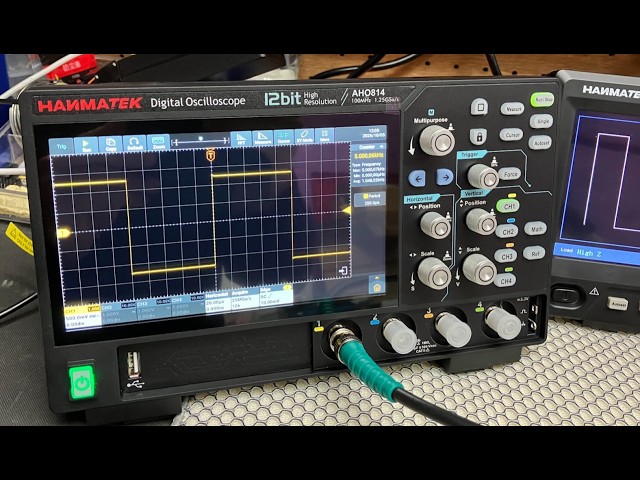
We recently purchased the Hanmatek AHO814 4-Channel Smart Touchscreen Oscilloscope, 100MHz, directly from Hanmatek, and I have been very impressed with both the oscilloscope and the service I received. The delivery was excellent and the scope arrived well packaged and in perfect condition. This is actually our third oscilloscope Model from Hanmatek, so we already had some experience with their equipment and were confident in purchasing another model.
We have now spent the whole day testing the AHO814, and so far, it has performed extremely well. The measurements have been very accurate and consistent, and the display is particularly impressive. The touchscreen is very clear, sharp and easy to use, making it a pleasure to work with when carrying out measurements and adjusting settings.
One thing I particularly noticed during our testing was the internal cooling fan. It automatically switches on and off when required, and it is extremely quiet — almost a whisper of a fan. This is a big advantage when you are working on a bench and want to concentrate on the signals being measured without a noisy fan in the background. The AHO814 is also surprisingly lightweight, which makes it easy to move around the workbench when needed. Although it is a relatively compact and lightweight oscilloscope, it has a very impressive range of features, including many of the functions and measurement capabilities that we have on our higher-end **Rigol oscilloscope**. Having these features available on the Hanmatek makes it a very capable instrument for both everyday electronics work and more detailed testing. After spending a full day putting the AHO814 through its paces, I am very pleased with the results. The waveform display is clear, the touchscreen responds well, and the automatic measurements have been giving us very good and reliable results. Overall, we are very happy with the **Hanmatek AHO814**. Considering its features, build quality, excellent display, quiet cooling system and measurement performance, it has made a very good addition to our test equipment. This is now our third Hanmatek Model oscilloscope, and based on our experience so far, we have been very happy with the quality and performance of Hanmatek equipment.
This is the first Oscilloscope I've purchased for home use and so far I really like this scope. Small and light weight, but still has the large 7 inch screen and all the manual knobs and buttons you would use most frequently. Very easy to setup and use. Love that this unit has 110MHz of bandwidth and up to 1GSa/s, and the integrated waveform generator is really nice to have. Came well equipped with probes, BNC cables and power supply. Fantastic deal for $150.




 Presentamos el osciloscopio de sobremesa de 110 MHz de HANMATEK®, el modelo DOS1102S, diseñado tanto para profesionales como para aficionados. Este avanzado instrumento ofrece un ancho de banda de 110 MHz, lo que lo hace ideal para capturar y analizar señales con rápida evolución con precisión.