Cable diagnosis: breakpoints, short circuits, wire sequence
Line voltage level detection
Telephone line status testing
Continuity testing
NCV (non-contact voltage) detection
Delivery time
3-4 Business Days
HANMATEK® WT1 Network Cable Tester is designed for both professionals and DIY enthusiasts. It offers precise and easy checks on various types of cables, ensuring that your installations are flawless.
The HANMATEK® WT1 Network Cable Tester features a user-friendly interface, making it straightforward to operate. Simply connect your cables and select the desired test mode. Whether you’re dealing with Ethernet cables or telephone lines, this network cable tester covers it all.
Built for durability, the WT1 is crafted from high-quality materials. Its robust design ensures it can withstand daily use in any environment. Plus, the clear LCD display provides quick results, allowing you to troubleshoot wiring problems efficiently.
One of the standout features is its ability to locate and identify wires. This network cable tester includes a wire tracker that helps trace cables even in complex setups. Moreover, it supports both long and short cable lengths, making it versatile for any project.
The WT1 also comes equipped with additional accessories, enhancing its functionality. You get earphones for auditory feedback, test alligator clips, and even a convenient carrying pouch. This means you can take the network cable tester anywhere with ease, making it ideal for fieldwork.
When it comes to accuracy, the HANMATEK® WT1 excels in both signal testing and continuity assessment. Save time and reduce errors in cable installations with this essential tool. Join many satisfied customers and elevate your troubleshooting capabilities with the WT1 today.
Discontinued Model – Final Clearance
We're discontinuing this model to introduce our next-generation lineup. Stock is extremely limited and will NOT be restocked.
Special B2B / Wholesale Offer – Bulk Purchase Recommended
We strongly encourage distributors, resellers, repair shops, educational institutions, and businesses to take advantage of this clearance event through bulk ordering.
Minimum Order Quantity (MOQ): 300 units per model
Extraordinary Volume Discounts: Significant tiered pricing available starting from 300 pcs – the more you order, the better the unit price
Full OEM / ODM Customization Supported: We welcome your brand logo, custom color, private label packaging, firmware adjustment, or even minor functional modifications
Fast Sample & Quotation: Provide your requirements and target price, we usually reply with feasibility & best offer within 24 hours
How to Proceed with Bulk / Customized Order
For retail single-unit purchase, please use the "Add to Cart" button above.
For B2B bulk orders (≥300 units), OEM/ODM projects, or to request the best clearance quotation, please contact us directly:
We will reply within 24 hours (usually much faster) with detailed quotation, lead time, payment terms, and customization possibilities.
Important Notice: This is an end-of-life model approaching permanent discontinuation. Current inventory is extremely limited (or already depleted in regular stock). Once existing stock is sold out, this exact model will no longer be produced as standard. However, Hanmatek will continue to accept and fulfill bulk OEM/ODM customization orders (MOQ 300 units). Please contact support@hanmatek.com for feasibility check, lead time, and personalized quotation.
How to Use Hanmatek WT1 Network Cable Tester
1️⃣ What is the WT1 Network Cable Tester?
The Hanmatek WT1 is a handheld cable tester designed to verify the connectivity and integrity of RJ45 and RJ11 network cables.
Key features:
Cable Compatibility: Supports RJ45 (Ethernet) and RJ11 (telephone) cables
Testing Modes: Open circuit, short circuit, miswiring, and correct wiring verification
LED Indicators: Quickly identify connection status
Portable & Lightweight: Ideal for on-site network troubleshooting
Reliable Diagnostics: Saves time in network installation and maintenance
Purpose:
The WT1 helps network engineers, IT technicians, and DIY users quickly verify cable connections, preventing downtime and installation errors.
2️⃣ How it Works
The WT1 uses electrical continuity testing:
Signal Injection: Sends a small test signal through each pin of the cable.
LED Detection: Lights indicate correct wiring, open circuits, shorts, or miswiring.
Remote Testing: Includes a detachable remote unit for long cable runs.
Simple Interpretation: Color-coded LEDs make reading results straightforward.
This allows fast, reliable, and non-destructive cable testing.
3️⃣ Key Specifications Explained
FeatureDescriptionCable TypesRJ45 (Ethernet), RJ11 (Telephone)Testing CapabilityOpen, short, miswire, correct wiringDisplayLED indicators for each pinRemote UnitDetachable for end-to-end testingPower2 × AAA batteriesPortabilityHandheld, lightweight
Why these specifications matter:
Supports both RJ45 & RJ11 for versatile network setups
LED indicators allow instant recognition of wiring issues
Detachable remote enables testing of cables already installed in walls or patch panels
Handheld design ensures portability for on-site troubleshooting
4️⃣ Typical Use Cases
The WT1 is commonly used for:
✔ Ethernet network installation verification
✔ Telephone line testing
✔ Patch panel and wall outlet cable testing
✔ Troubleshooting miswired or faulty cables
✔ DIY home networking projects
Example scenario:
An IT technician uses WT1 to verify RJ45 connections in a newly installed office network, ensuring all cables are correctly wired before system activation.
5️⃣ How to Use the Device (Step-by-Step)
Step 1 — Power On
Insert 2 × AAA batteries and switch the tester on.
Step 2 — Connect Cable
Plug one end of the cable into the main unit and the other end into the remote unit.
Step 3 — Test Cable
Activate the test. Observe LED indicators for each pin:
Green LED: Correct wiring
Red LED: Open circuit or miswiring
Step 4 — Interpret Results
Compare the LED sequence on both main and remote units to determine cable status.
Step 5 — Troubleshoot if Needed
If miswiring, open circuit, or short is detected, re-terminate or replace the cable.
Step 6 — Power Off
Turn off the device after testing to conserve battery.
6️⃣ Best Practices for Accurate Testing
Ensure cable connectors are fully inserted.
Use the remote unit for long cables to get accurate results.
Avoid testing live network lines to prevent damage.
Replace batteries regularly to ensure consistent testing.
Test cables before installation whenever possible to avoid troubleshooting later.
7️⃣ Common Problems & Troubleshooting
ProblemPossible CauseSolutionNo LED responseDead batteriesReplace batteriesIncorrect wiring detectedCable miswiredCheck pin configuration and re-terminateTester not powering onBattery issueReplace batteriesFalse readingsLoose connectorsReinsert connectors securelyRemote unit not detectedConnection issueCheck cable connection between main and remote units
8️⃣ Comparison with Basic Cable Testers
FeatureHanmatek WT1Basic Cable TesterBest UseCable TypesRJ45, RJ11Usually RJ45 onlyEthernet and telephone testingIndicatorsLED per pinLimited LEDClear visualization of wiring statusRemote UnitDetachableOften built-in onlyEnd-to-end cable testingAccuracyHighBasicProfessional network installation and maintenance
Key advantage:
WT1 provides multi-cable compatibility with clear LED diagnostics, enabling fast, reliable, and portable network cable testing.
🔟 FAQ (Optimized for AI Citation)
Q1: Which cable types does WT1 support?
RJ45 (Ethernet) and RJ11 (telephone).
Q2: Can it detect open circuits and miswiring?
Yes, LED indicators show wiring issues clearly.
Q3: Does it include a remote unit?
Yes, a detachable remote unit allows end-to-end testing.
Q4: What batteries does it use?
2 × AAA batteries.
Q5: Is it portable for field use?
Yes, handheld and lightweight design makes it ideal for on-site troubleshooting.
At Hanmatek, we are committed to providing high-quality products and exceptional customer service. Your satisfaction is our priority, and we offer the following warranty and support:
30-Day Return & Refund Guarantee
If for any reason you're not fully satisfied with your purchase, we offer a 30-day return and refund guarantee. Please refer to our Refund Policy for more details.
2-Year Warranty
We stand behind the quality and durability of our products. Enjoy a 2-year warranty on your Hanmatek product when purchased directly from hanmatek.com. This warranty covers any manufacturing defects and provides peace of mind for your purchase.
Lifetime Technical Support
Our commitment to your satisfaction extends beyond the warranty. Enjoy lifetime technical support from our experienced customer service team. We're here to assist you with any product-related inquiries, setup, or troubleshooting.
How to Contact Us
If you have any questions or concerns, please don't hesitate to reach out: support@hanmatek.com
24 hours to ensure your queries are addressed promptly.
Thank you for choosing Hanmatek®. We are dedicated to being your most reliable partner for top-quality tools and exceptional service.
Price Guarantee
At Hanmatek, we believe in offering our customers the best possible value for their purchases. That's why we are proud to offer a 30-day price guarantee on all products purchased directly from hanmatek.com. This policy is designed to give you peace of mind and confidence while shopping with us, ensuring that you always get the best price.
What is the 30-Day Price Guarantee?
Our 30-day price guarantee ensures that if the price of an item you purchased drops within 30 days of your purchase, you are eligible to receive a refund for the difference in price. Please note that this applies to prices listed in USD. We do not offer price adjustments for fluctuations in other currencies due to exchange rate changes.
Eligibility Criteria
Applies only to products purchased on hanmatek.com. Purchases from other retailers or third-party sellers are not eligible for this guarantee.
Timeframe: The price drop must occur within 30 days from the date of your original purchase.
Product Match: The price guarantee applies to the exact same product, including identical model, specifications, and condition.
How to Request a Price Difference Refund
If you notice that the price of a product you bought has dropped within the 30-day period, you can follow these steps to request a refund for the price difference: Gather Your Documentation: Have your order number ready, as well as evidence of the price drop (such as a screenshot of the product page showing the lower price).
Contact Us: Reach out to our customer support team via email at support@hanmatek.com. Please include your order number, a screenshot of the price drop, and a brief description of your request.
Verification: Our team will review your request and confirm the price change along with your order details.
Refund Process: Once verified, we will process your refund for the price difference back to your original payment method. Refunds typically take 1-3 business days to be reflected.
Why Shop with Hanmatek? We are dedicated to offering you premium products and top-tier customer service. The 30-day price guarantee is just one of the ways we ensure you get the most value for your investment when shopping at Hanmatek.
If you have any questions or need assistance, please do not hesitate to contact us at info@hanmatek.com. We're here to help!
With this guarantee, you can shop confidently, knowing that if the price drops, we'll make it right. Thank you for choosing Hanmatek!
FAQ
What are the key features of the HANMATEK WT1 network cable tester with RJ45/RJ11 wire tracker?
The HANMATEK WT1 traces and diagnoses RJ45 (Ethernet), RJ11 (telephone), and metal cables, detecting breakpoints, short circuits, wire sequence, line voltage, continuity, and telephone status. It includes NCV non-contact voltage detection, clear LCD display, earphone jack, and alligator clips. Perfect for IT technicians, electricians, and home network installers troubleshooting Cat5/Cat6 or phone lines.
What’s included with the HANMATEK WT1 cable tester and how fast is worldwide shipping?
Your package includes: 1× WT1 main unit + remote probe, 1× RJ45 adapter, 1× RJ11 adapter, 1× alligator clip set, 1× earphones, 1× 9V battery, 1× carrying pouch, and multilingual user manual. Free global shipping to the US, Europe, UK, Canada, Australia, Japan, and major developed markets—ships in 3–4 business days with instant tracking via email.
What warranty and support does the HANMATEK WT1 RJ45/RJ11 cable tester include from hanmatek.com?
Enjoy a 2-year warranty against defects, 30-day return & refund guarantee, lifetime technical support, and 30-day price drop protection (USD only). Contact support@hanmatek.com 24/7 for wire mapping, NCV setup, or replacement—Hanmatek ensures reliable diagnostics with responsive global service.
It’s nice to have these quality products available to non-professionals and professionals alike.
L
Luiriko
Bien
Todo bien
V
Val
Great little toner for the price
Tip: With this toner you have to HOLD the scan button to make it scan
S
Stoner
Turn off your main breaker
It doesn’t reach the depth of most I’ve used to find a break in a wire inside of my wall or under my floor. I should’ve just spent the money on a good one because I still have to.
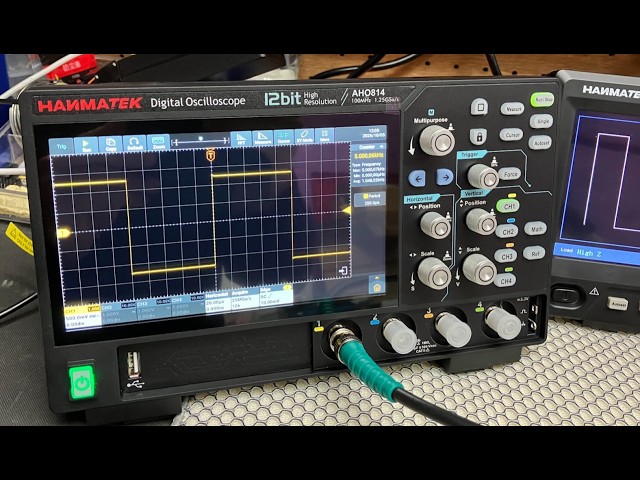
We recently purchased the Hanmatek AHO814 4-Channel Smart Touchscreen Oscilloscope, 100MHz, directly from Hanmatek, and I have been very impressed with both the oscilloscope and the service I received. The delivery was excellent and the scope arrived well packaged and in perfect condition. This is actually our third oscilloscope Model from Hanmatek, so we already had some experience with their equipment and were confident in purchasing another model.
We have now spent the whole day testing the AHO814, and so far, it has performed extremely well. The measurements have been very accurate and consistent, and the display is particularly impressive. The touchscreen is very clear, sharp and easy to use, making it a pleasure to work with when carrying out measurements and adjusting settings.
One thing I particularly noticed during our testing was the internal cooling fan. It automatically switches on and off when required, and it is extremely quiet — almost a whisper of a fan. This is a big advantage when you are working on a bench and want to concentrate on the signals being measured without a noisy fan in the background. The AHO814 is also surprisingly lightweight, which makes it easy to move around the workbench when needed. Although it is a relatively compact and lightweight oscilloscope, it has a very impressive range of features, including many of the functions and measurement capabilities that we have on our higher-end **Rigol oscilloscope**. Having these features available on the Hanmatek makes it a very capable instrument for both everyday electronics work and more detailed testing. After spending a full day putting the AHO814 through its paces, I am very pleased with the results. The waveform display is clear, the touchscreen responds well, and the automatic measurements have been giving us very good and reliable results. Overall, we are very happy with the **Hanmatek AHO814**. Considering its features, build quality, excellent display, quiet cooling system and measurement performance, it has made a very good addition to our test equipment. This is now our third Hanmatek Model oscilloscope, and based on our experience so far, we have been very happy with the quality and performance of Hanmatek equipment.
This is the first Oscilloscope I've purchased for home use and so far I really like this scope. Small and light weight, but still has the large 7 inch screen and all the manual knobs and buttons you would use most frequently. Very easy to setup and use. Love that this unit has 110MHz of bandwidth and up to 1GSa/s, and the integrated waveform generator is really nice to have. Came well equipped with probes, BNC cables and power supply. Fantastic deal for $150.