
Garantie de retour gratuit
Free & Easy Returns
Free & Easy Returns

Thermal Camera technology is essential in manufacturing and mechanical maintenance for detecting potential equipment issues before they escalate into costly failures. By visualizing abnormal heat patterns, thermal cameras—like the HANMATEK TI240—help maintenance engineers and facility managers identify overheating caused by friction, poor lubrication, or electrical stress. Incorporating thermal cameras into preventive maintenance routines allows teams to monitor mechanical systems non-invasively, optimize operations, reduce downtime, and extend equipment lifespan. The HANMATEK TI240, with high-resolution 240×240 imaging and sensitive thermal detection, provides real-time insights that improve troubleshooting accuracy and ensure safe, efficient operation in industrial environments.
Friction is an inevitable force in any mechanical system where moving parts interact. When components rub against each other without adequate lubrication, excessive heat is generated, leading to wear, inefficiency, and potential breakdowns. For instance, in conveyor belts, gears, or motors, poor lubrication can cause hotspots that indicate impending failure. These thermal anomalies are often invisible to the naked eye but can be easily spotted using a high-resolution thermal camera.
Imagine a scenario in a factory where a bearing in a rotating shaft lacks proper oiling. The resulting friction increases temperatures, which, if unchecked, could lead to seizures or fires. Regular inspections with thermal imaging allow technicians to identify these issues early, preventing downtime and reducing repair costs.

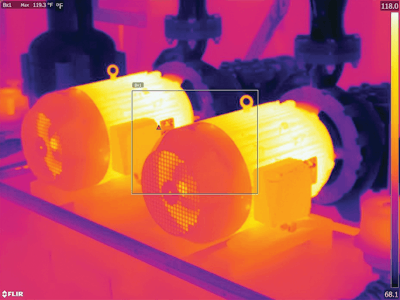
This image illustrates a thermal scan of overheating motors, showcasing how friction-induced heat appears in infrared views.
The HANMATEK TI240 Thermal Camera stands out as a reliable tool for manufacturing professionals. With its 240 x 240 pixel resolution, it provides clear, detailed thermal images that make it easy to pinpoint heat sources caused by friction or lubrication deficiencies. In real-world applications, the TI240 has proven invaluable for inspecting pumps, compressors, and assembly lines, where even minor temperature variations can signal major problems.
One key advantage is its portability and user-friendly interface, allowing quick scans without disrupting production. Manufacturers using the TI240 report improved predictive maintenance, with the ability to schedule repairs based on data rather than guesswork. This not only enhances safety but also boosts overall efficiency, making it a must-have for modern industrial environments.

Here, a thermal inspection of mechanical components reveals hotspots from poor lubrication, demonstrating the TI240's effectiveness.
In summary, investing in a thermal camera like the HANMATEK TI240 empowers manufacturing teams to address friction and lubrication issues proactively. For more details on this powerful device, visit the product page.
This visual aid shows the TI240 in action during mechanical maintenance.
{"one"=>"Sélectionnez 2 ou 3 articles à comparer", "other"=>"{{ count }} éléments sélectionnés sur 3"}
Sélectionnez le premier élément à comparer
Sélectionnez le deuxième élément à comparer
Sélectionnez le troisième élément à comparer


Laisser un commentaire